Check the troubleshooting steps below if the Daydream screen of the Android TV™ keeps appearing even after the Daydream feature has been turned Off.
NOTE: Below are examples of the Daydream screen that may randomly appear on the Android TV.

-
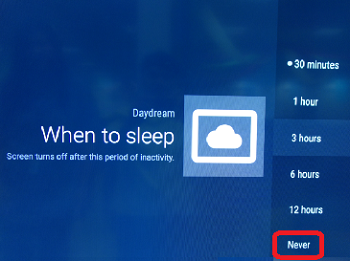
Make sure the When to Sleep is set to Never.
- Using the supplied remote control, press the HOME button.
- On the HOME screen, select Settings.
- Under the Settings menu, select TV.
- Under the TV category, select Daydream.
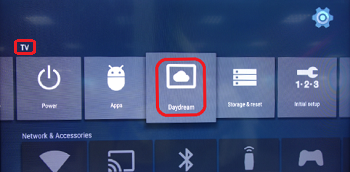
- Select When to sleep.
- Select Never.
-
Make sure the Developer Options is activated.
- Using the supplied remote control, press the HOME button.
- On the HOME screen, select Settings.
- Under the Settings menu, select TV.
- Under the TV category, select About.
- Under the About category, select Build.
- Once Build is selected, press the enter button seven times.
NOTE: Congratulations you are now a developer will appear after the enter button is pressed.
-
Make sure the Stay Awake function is set to On.
- Using the supplied remote control, press the HOME button.
- On the HOME screen, select Settings.
- Under the Settings menu, select System Preferences.
- Under System Preferences, select Developer Options.
- Select Stay Awake.
- Select On.